
Return to FAQ Page
Enviro Data Setup
Answers that will help you set up Enviro Data. For specific answers on using the program, please see the Using Enviro Data section.
Questions
The answer is yes but this can depend on what computer and network you are running Enviro Data on. Also, the speed of this connection will depend on the speed and latency of your connection.
Mounting an Azure File Share involves running a PowerShell script (In Admin mode) on the computer you need to connect from. See How to mount an Azure Files share in Windows | Azure Tips and Tricks (youtube.com). This will create a local drive from which you can Attach to an Enviro Data database. See screen shots below from our Windows Server VM on Azure where Drive E has been mapped to Azure Blog File Share “Enviro”.
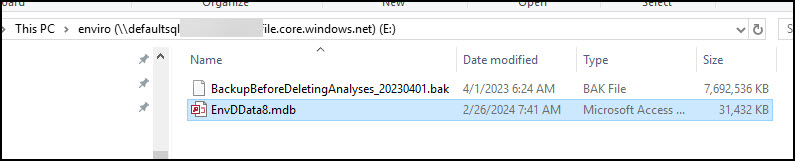

However, for this to work Port 445 on your network will have to be open. While I did this successfully on our Windows Server running on an Azure VM, I am not able to connect from my local Windows 11 Pro computer from home because Port 445 is either blocked by my router or ISP. You can check this in advance by running a free utility called Shields Up at GRC | ShieldsUP! — Internet Vulnerability Profiling. On that page click on Common Ports within the large blue graphic to run it then scroll down to check to see if Port 445 is open or closed (Stealth).

If your network or ISP has Port 445 blocked, Azure provides links to instructions on how to work around this issue located immediately below the windows where you found the PowerShell script. They generally involve a VPN and may involve a monthly fee from Microsoft or others.
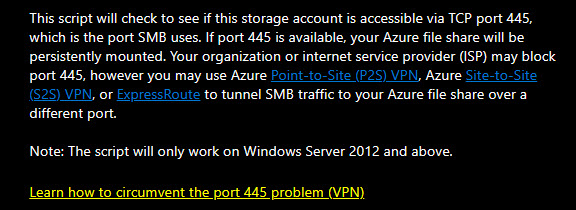
Note that if Port 445 is blocked on your router, you may be able to redirect or unblock it. You would need to contact the router manufacturer to determine how to do that.
You can start a new project in Enviro Data by opening the Editor and clicking the Create New Project button under Setup. The file name and the path that the project is being saved to must not contain spaces and in some cases special characters. Note that this new project will contain all the lookups from the project that is already attached to the Editor. If you have used the example database, EnvDDate8, we recommend that at a minimum, you replace all or the parameter names for the parameter name you will be using for your new project. Sites, Stations and Samples are not copied to the new project.
Page 2 of 2
- 1
- 2