
The most common problem is that the EDD does not contain one or more a Lookup values that match the lookup values in the Lookup tables. This could be any of the required lookup fields and these fields are identified by Red font in the example EDDs found in the C:\Enviro\Edata8 folder. The figure below is from a portion of the import example DTSFormat8.xlsx. If a required lookup is not correct and/or not entered in the EDD, you will get an error.

After completing the initial steps to import an EDD file, you will see the EDIT IMPORT FILE form if there are errors and these will be shown in the ImportProblem field on the form below .
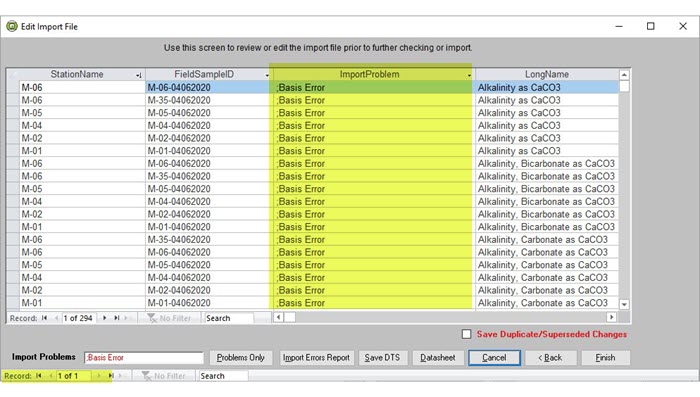
In this example, in the ImportProblems field there is a Basis Error but there could be other errors shown there. There can also be mulitple pages of errors* hown in the Access Record Control found in the lower left.
In the case above, the value for "Basis" in the EDD file being imported that is not in the Basis table. To find the problem code you can scroll right in this form until you find the Basis (or your problem) field and determine what the flagged value is. You will need to stop the import, either correct the EDD file or add a new basis value to the Basis lookup table, and try the import again.
If the problem is a missing value in one of the lookup tables, you will have to stop the import and add the missing value. You can add/edit the missing/incorrect lookup values from the EDITOR --> Manage Lookups and click on the button for the table with the problem. (On the MANAGE LOOKUPS form you may have to click the Show More. to find the specific lookup table button you need.)
Once all corrections have been made, try the import again.
* WARNING: Check the Access Record Counter in the lower left of the EDIT IMPORT FILE form highlighted above to see if there are additional error pages.