
NOTE - this process can also be used to add missing CAS Numbers using a spreadsheet that contain both a LongName and the correct CASNumer field. In both cases, the LongName must match a record in the Parameters table.
As frequently happens, a client needed to import a new set of regulatory limits. They proceeded with normal a Reg. Limit Import and a properly formatted reg. limit format file.
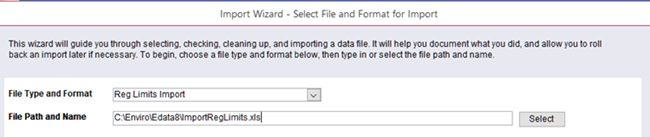
However, when they ran the Reg. Limit Import, the Enviro Data Editor required them to add many new parameters.

This happened even though they were using the setting tp Use CAS Numbers which should have allowed them to match Parameters using their CAS Number.

It was determined that their Parameters table either:
- These new reg. limit parameters were not in the Parameters table,
- If they were present, their names were not spelled the same and/or,
- The parameters to be matched did not have CAS Numbers.
It turned out, all three of the above were true and the import was canceled.
To be able to add the new Reg. Limits, first, we had to update the Parameters (that were in the Reg. Limit Import file) in the Parameters table with the missing CAS Numbers. This required that we link to their Reg. Limit import file in Enviro Data. This can be done by following the steps below.


The Excel file has been linked and named Table 1.
Once the file is Linked in Enviro Data, you need to create a new Query by clicking on Create in the Access Menu and then on Query Design.

When the query opens, right-click on the query's header and Choose SQL View.

You will then copy in the following code by first highlighting the word "Select" and paste in the code
UPDATE [Table 1] INNER JOIN [Parameters] ON [Table 1].ParameterName = [Parameters].LongName SET [Parameters].CASNumber = [Table 1].[CASNumber]
WHERE (([Parameters].[CASNumber] Is Null));
Note that if a "3" shows as seen below, place your curser to the right of it and hit the Backspace key. You should still see the semicolon at the end of line 2 but no spaces. At some point, you will be asked to Save the query. It is not important what you name it so long as you can find it again when needed.

Ensure that the table you linked to, Table 1, is correct. To make sure, right-click the query's header and choose Datasheet View. You should see a number of empty records.
In the Access Menu, click on Query Design. You should see the Update icon highlighted. Run the query to update Parameter records without CAS Numbers.

You are now ready to add the new Parameter names in your new Reg. Limits to the Parameters table. To do this, see the FAQ How can I import new parameters into my database?.