
The formats for User-Defined Formats are stored in two places in the Setting8 file; the: SavedImportFormat and SavedImportFormatDetails tables.
If you are setting up a new user that needs these import formats, you could simply copy your Setting8 file into their C:\Enviro\Edata8 folder.
However, if they already have other customized settings different from yours you can copy these tables from your Settings8 file to another users Settings8 file. You can access these by opening C:\Enviro\Edata8\Settings8.mdb and pushing the F11 key to show the Access files list. In the search box, type in "savedimport" and it will display them as shown below. (If you do not see the Search Bar, simply right-click next to the word Tables and choose Search Bar.)
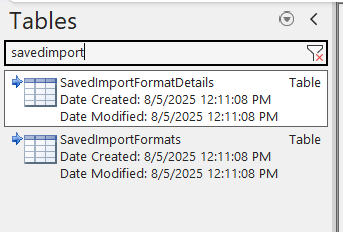
Before moving them. in the new computer, back up these original tables up by renaming them with a different name. For example, adding a suffix to the file name like SavedImportFormat_Original will preserve them if they are needed later.
When ready, open the original PC's Setting8 files in Access and simply drag these two modified files one at a time from the original to the new PC's Settings8 file's table list.