Analytic Flag Codes
The FlagCode field (aka Data Qualifier) is available in electronic data deliverables or EDDs provided by your lab and is loaded into the Analyses table. When a qualifier is not needed, the FlagCode field in the EDD should be left null (blank). When needed, it can contain up of four individual FlagCodes each with up to four characters. When multiple Flag Codes are used in this field, they must be separated by either a space or comma, such as “J1 J2”. This not only applies to FlagCode, but also to ProblemCode, and ValidationCode. However, if one is needed, it must have a matching entry in the appropriate lookup table: AnalyticFlags, ProblemCode, or ValidationCode.
It is important to understand that in Enviro Data there are two similar but different FlagCode fields, one in the AnalyticFlags lookup table and a different but similar on in the Analyses data table. The FlagCode field in the Analyses table contains one or more FlagCodes from the AnalyticFlags table and they are separated by either a comma or a space.
AnalyticFlags Lookup Table
The flag code in AnalyticFlags is a lookup that stores a single code and cannot contain any spaces or commas. The AnalyticFlags table stores the following:
- FlagCode is the code for ONE Analytic Flag. It can contain multiple characters but cannot contain a space or comma.
- AnalyticFlag is a description of the code.
- ReportingFactor is used as a multiplier for statistical analysis. Note that this can be impacted by selections in Non-Detect Options on the Display/Graphing Options
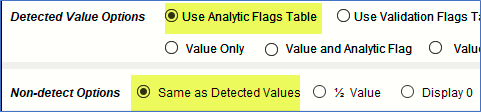
- ReportingBasis indicates how to display the output. See examples in Reporting Basis. NOTE: Use Analytic Flags Table must be selected in the Detected Value and Same as Detected Values on the Display/Graphing Options form as shown below for the Value and Flag field to be displayed in the ReportingBasis format in Reports or Exports.