
Parameter Units are used by Enviro Data for comparison to regulatory limits and for the unit conversion feature. (Unit conversion allows you to determine the target units for a conversion during import or reporting so all units are the same for the specific parameter.) You can associate one reporting unit or Parameter Unit for each combination of a parameter and matrix.
For use with Regulatory Limits, the Parameter Units and the matrix must match the units and matrix of the limits you are checking against.
They are also used during import checking, the Validation module, and in some reports.
You can view and edit Parameter Units by going to the EDITOR's Setup section, clicking on Manage Lookups and then clicking on Parameters. This will open the PARAMETERS form seen below. You can select the parameter desired in the Go to Parameter dropdown. Both the Matrix and Parameter Units can be set by using dropdowns in the appropriate text box. Note that both the Matrix and Units chosen must be present in their appropriate lookup table.
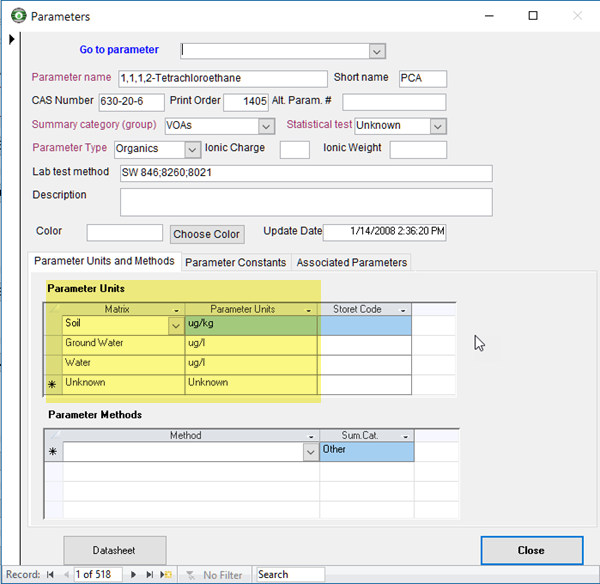
If you have started a new database and wiped out all the data in the Parameters along with its related table and have a large number of ParameterUnits to populate, Geotech Support may be able to provide a query to populate the ParameterUnits for you but you will need to provide a spreadsheet with the parameter names, matrices and units in order to run this query.
In order to have these work with your data, make sure you also set Unit Conversion in the Display Options form as shown below.
